
How We Turned IDX Broker Property Searches Into Leads — Part 2
By Sarah Lennon – 7 minute read
In Part 1 of this series, I explained how we customized IDX Broker for our Real Estate client, turning its standard listings interface into something that looked and felt like part of the website. But getting the property search to look right was only half the job. Once visitors were using it, a much more important question emerged:
What happens when somebody starts showing genuine interest in a property?
IDX Broker already includes lead registration, saved searches, favourites, automated emails, contact routing and notifications. The functionality was there. Our job was to decide how to use it without turning the clients property search into one of those websites that demands your email address before you’ve had a chance to look at anything. That distinction became the basis for the entire lead-generation setup.
Starting With the Lead Capture Strategy
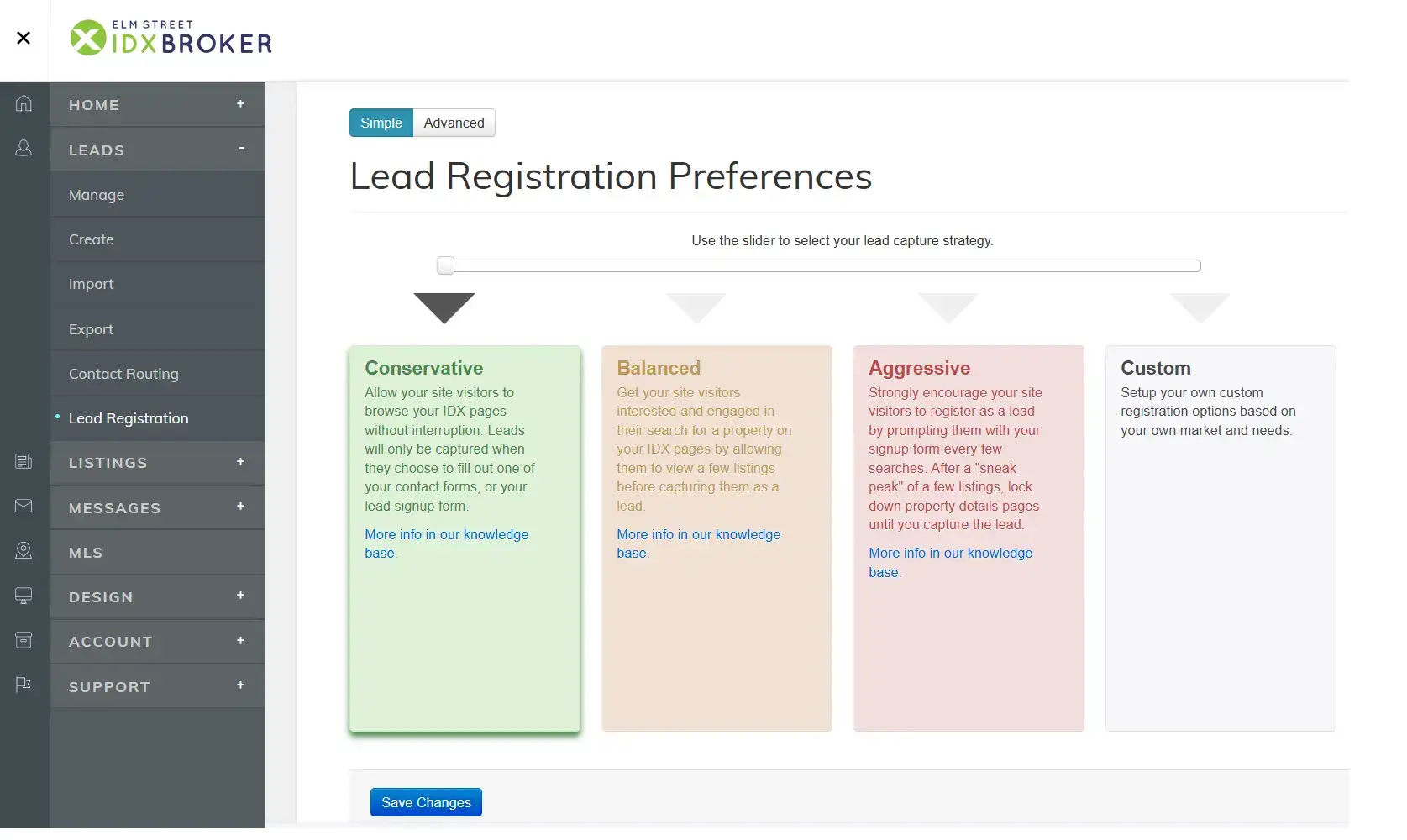
IDX Broker provides several approaches to lead registration, ranging from Conservative through Balanced and Aggressive to a completely Custom configuration. The difference is essentially how quickly, and how insistently, visitors are encouraged to register.
The clients IDX was initially set by default to Conservative. Visitors could browse the listings freely and would generally become leads only when they actively chose to save something, use a contact form or register themselves. At the other end of the scale, IDX can be configured to restrict access much sooner and require registration before a visitor can continue viewing property details. Neither extreme felt right for our client. We wanted to identify people who were doing more than casually browsing, but we didn’t want to make registration the price of simply using the website. So rather than relying on one of IDX Broker’s predefined strategies, we configured the registration behaviour ourselves using the Custom configuration.
Request Registration. Don’t Force It.
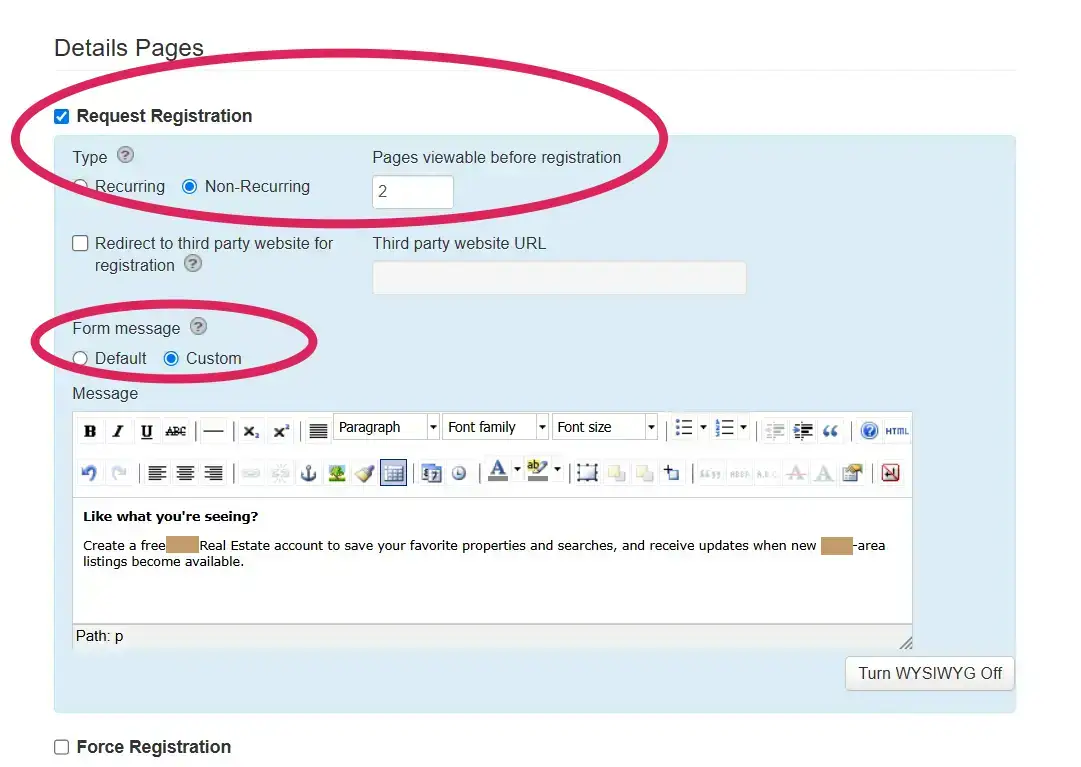
This was the most important decision in the setup. We configured IDX Broker to allow a visitor to view two property detail pages before displaying a registration request. We also made that request non-recurring. That means somebody can explore the map and browse the listings normally. Once they have opened two individual properties, IDX asks whether they would like to create an account. If they don’t, they can dismiss the request and continue. We deliberately left Force Registration switched off.
The distinction matters. Someone moving around a property map may simply be exploring. Someone who has opened several individual properties is beginning to demonstrate a different level of interest. That’s the point at which asking them to register makes sense. Not before.
Give People a Reason to Register
We also replaced the generic registration message with something written specifically for the client: Like what you’re seeing? Create a free Real Estate account to save your favorite properties and searches, and receive updates when new area listings become available. It’s a small change, but an important one. Instead of simply asking for information, the message explains what the visitor gets in return. They can save properties. Save searches. Receive new-listing updates. Registration becomes a useful feature of the property search rather than an obstacle placed in front of it.
What Happens After Someone Registers?
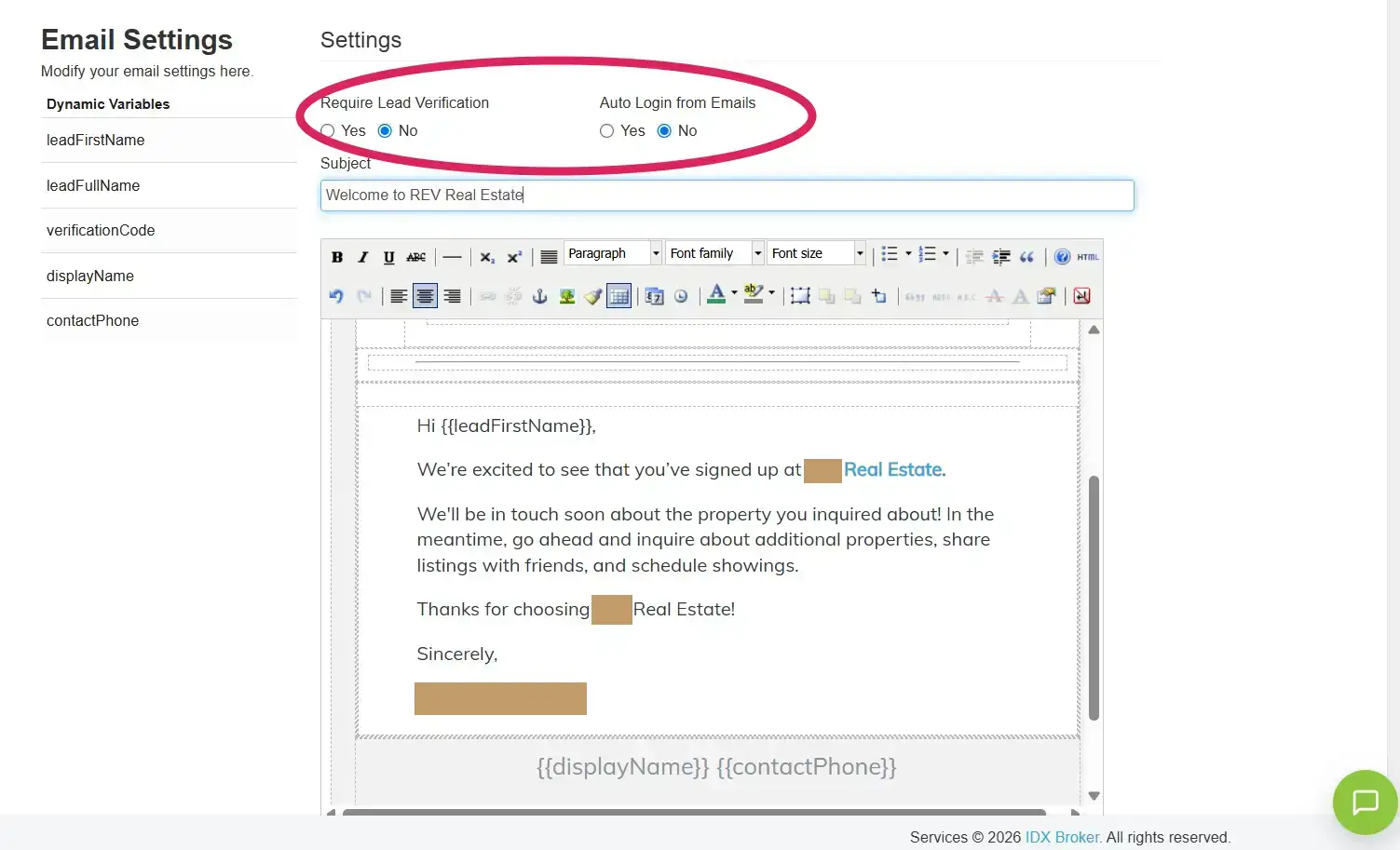
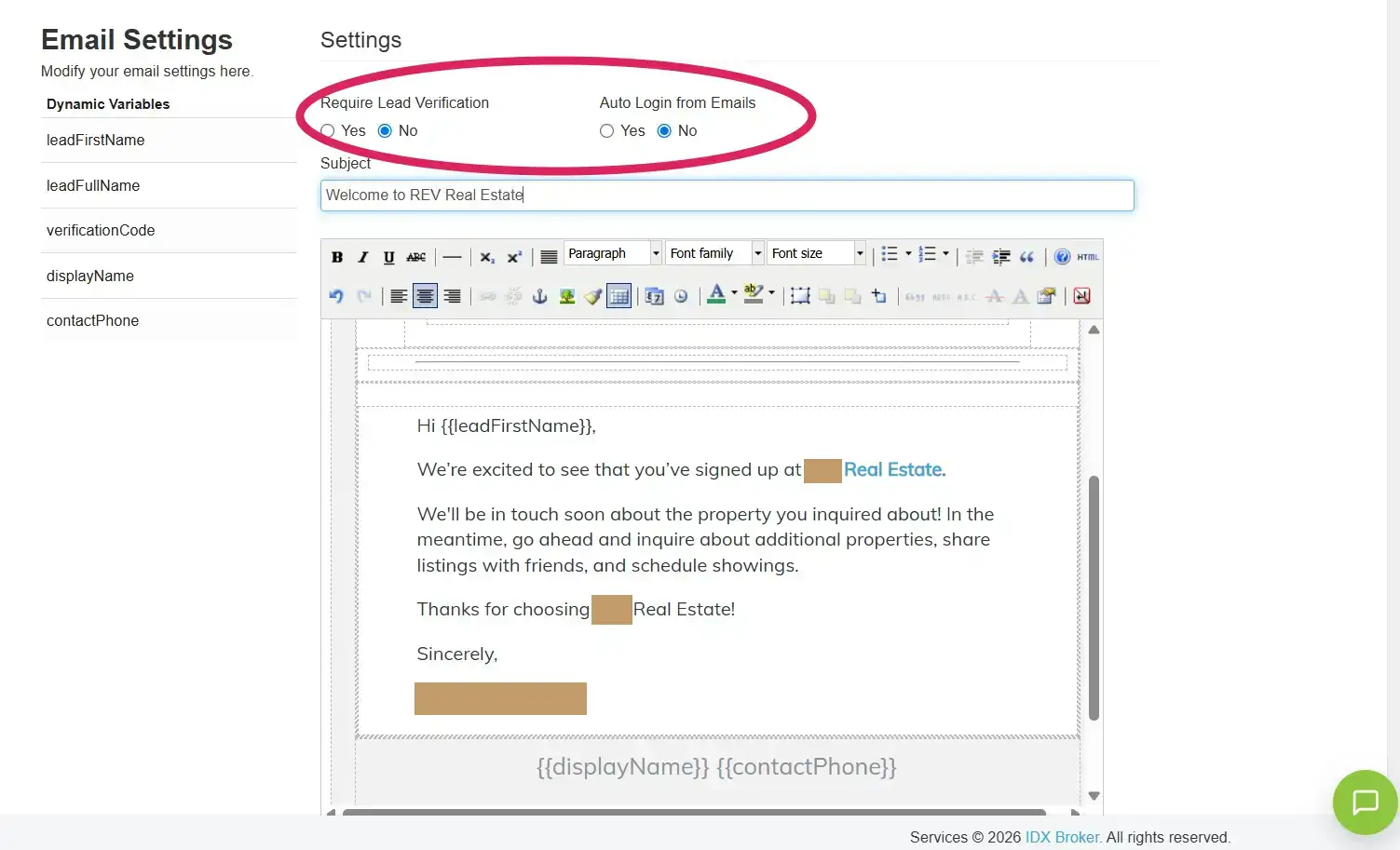
Capturing an email address isn’t the end of the process. Once somebody creates an account, IDX Broker can immediately send an automated response. The standard email worked, but just as we’d done with the listings interface in Part 1, we wanted the communication to feel like it came from REV rather than from the software powering the website. We therefore customized the welcome email and its subject line.
We also chose not to require lead verification. Once someone registers, their account is created without adding another verification step between them and the property search. The visitor gets an immediate REV-branded response, while their information enters IDX Broker as a lead. Now we needed to decide where that lead went.
Getting the Lead to the Right Person
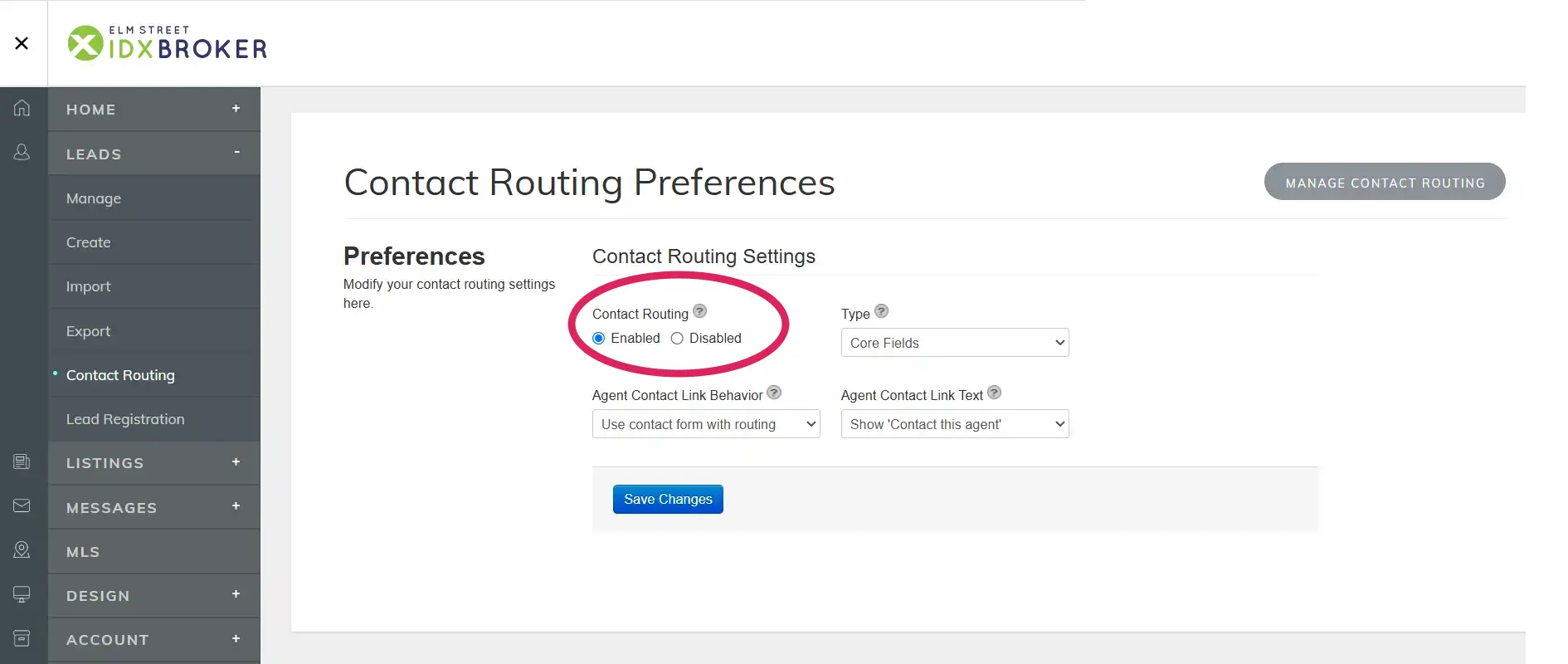
IDX Broker includes contact routing, allowing incoming leads to be assigned according to rules rather than simply disappearing into the main account. We enabled contact routing using IDX Broker’s Core Fields. This gave us the ability to route leads according to information associated with the enquiry, including location. For our client, we didn’t need a complicated network of rules. We needed one very clear one.
Setting Up An Agent to Receive the Leads
Maria remains the primary IDX Broker account holder, but Susan handles the incoming property enquiries. Rather than changing the ownership of the IDX account or trying to work around it, we used IDX Broker’s existing agent structure. Susan already had her own agent record, including her real estate email address. That gave us a defined recipient for the leads while leaving the main account structure exactly as it was.
Adding Immediate SMS Notification
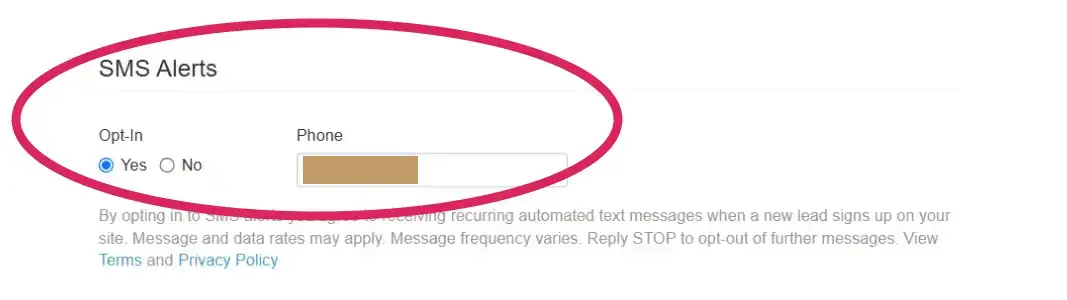
Email notifications are useful. For a new property lead, however, speed matters. Inside Susan’s agent settings, we therefore also enabled IDX Broker’s SMS alerts and connected them to her phone number. Now the system isn’t dependent on somebody noticing an email sitting in an inbox. When a new lead arrives, Susan can be alerted directly by text. That completed the notification side of the system. The final step was telling IDX Broker which leads should actually go to her.
Routing Wyoming Leads to a Specific Agent
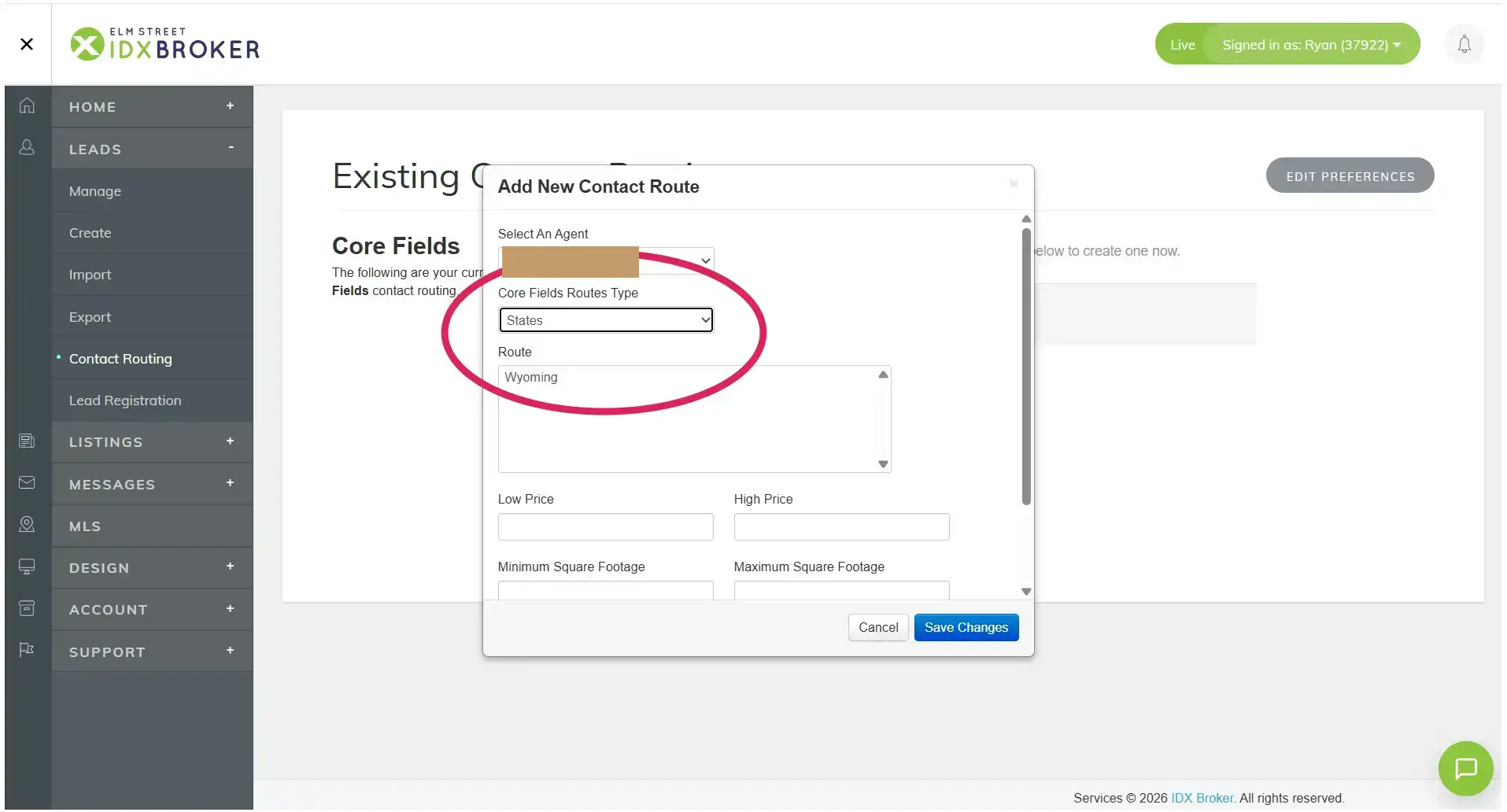
IDX Broker’s contact routing can become considerably more sophisticated if a real estate business needs it. Routes can be created using different criteria, and additional restrictions can be applied around things such as price, square footage and acreage. Our client didn’t need that complexity. The website serves the Wyoming market, so we created a simple Core Fields routing rule:
Agent: Susan Smith
Route Type: States
State: Wyoming
We deliberately left the additional price, square-footage and acreage fields unrestricted. There was no reason to create rules the business didn’t need
The Finished Contact Route
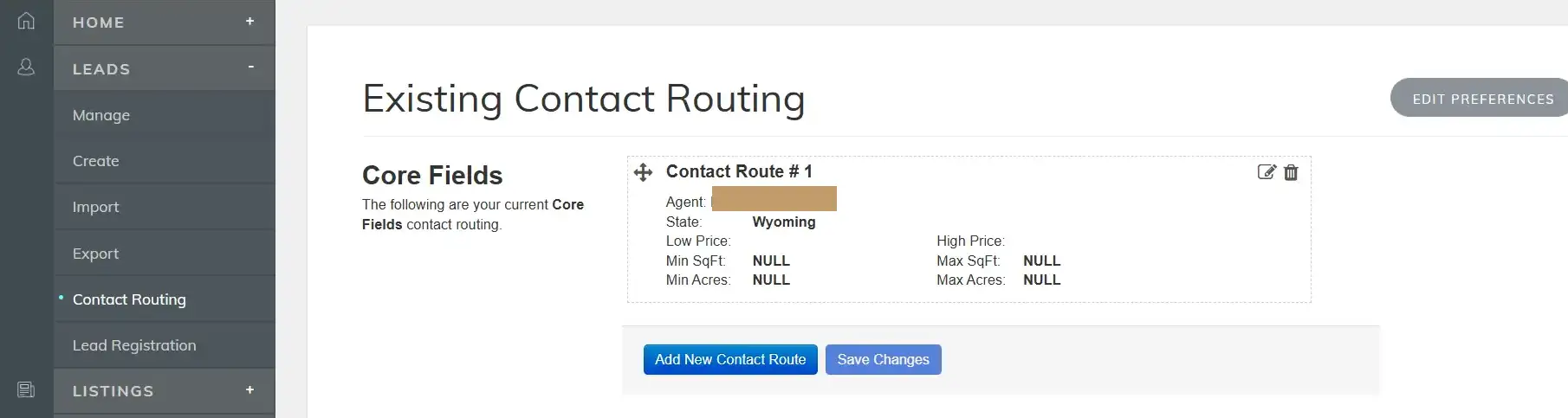
Once saved, the finished route is refreshingly simple. Wyoming leads are routed to Susan. That’s it. And that’s really the point. There are plenty of additional options inside IDX Broker, but a more complicated setup isn’t automatically a better one. The configuration should reflect what actually happens inside the business. For our client, the requirement was straightforward: identify interested property visitors and get those enquiries to Susan quickly. The technology should make that easier, not introduce another layer of administration.
The Finished Lead Flow
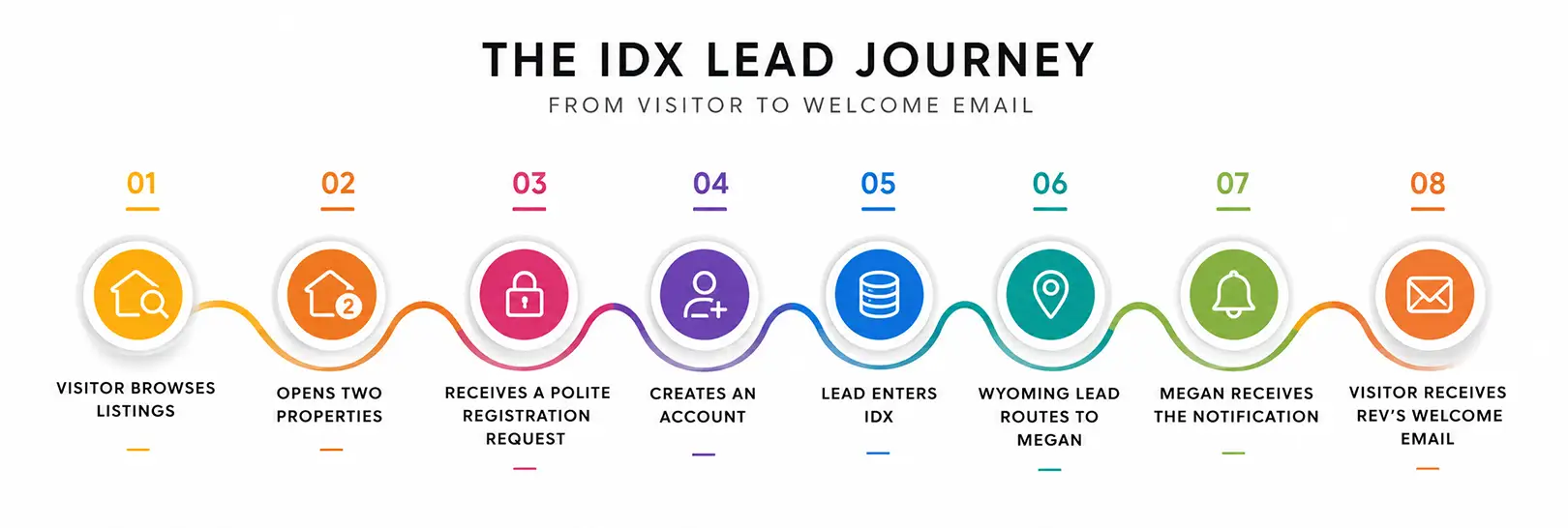
The complete process now works like this:
Visitor browses listings → opens two property detail pages → receives one polite registration request → creates a free REV account → lead enters IDX Broker → Wyoming lead routes to Susan → Susan receives the notification → visitor receives our clients’s welcome email.
Meanwhile, visitors who don’t want to register can simply continue browsing. That’s important. The objective wasn’t to capture the maximum possible number of email addresses. It was to identify visitors who were showing genuine interest without making the property search unpleasant for everybody else.
Lead Generation Is Part of the User Experience
This is the part of IDX integration that can easily be overlooked. It’s tempting to think of lead generation as something that happens behind the website: forms, email addresses, notifications and CRM records. But the first half of that process belongs entirely to the visitor. When do you interrupt them? What do you ask for? Why should they give it to you? What happens immediately afterwards? Those decisions affect the experience just as much as the colour of a button or the layout of a property card.
In Part 1, our job was to make IDX Broker feel like part of our clients’s website visually. In Part 2, the job was to make it behave like part of our client’s actual sales process. The two are connected. A property search can look fantastic, but if genuinely interested visitors quietly disappear afterwards, it isn’t doing its full job. That same principle applies well beyond real estate. A website can attract visitors and look exactly as intended, but that doesn’t automatically mean it will generate business. We explored that distinction in Can a Website Increase Sales? Here’s What Actually Makes the Difference.
From Property Search to Prospect
IDX Broker already had almost every tool we needed. We didn’t build a custom lead-generation system and we didn’t replace IDX Broker’s existing functionality. We configured what was already there around the way our client actually operates. That meant choosing the right moment to ask for registration, explaining why creating an account is useful, removing unnecessary barriers, customizing the visitor communication, routing enquiries to the right person and making sure that person knows quickly when a new lead arrives.
Individually, none of those changes is particularly dramatic. Together, they turn a property search into something much more useful to the business behind it. And that is ultimately what good website development should do. It’s also a good example of why our expectations of a website need to go beyond how it looks at launch. The more useful question is what the website is actually expected to do once real people start using it. Next: Part 3 — What It Really Takes to Rebuild the IDX Broker Property Popup
If you’re interested in the thinking behind this project, read the other articles in our IDX Broker series:
- How We Gave an IDX Broker Listings Page a Fully Custom Look — Part 1: customizing the REV property search and bringing IDX Broker into the website’s visual system.
- Finishing Our IDX Broker Customization: Solving the Property Popup — Part 3: rebuilding the IDX Broker property popup for desktop while preserving its native responsive behavior on smaller screens.

About Sarah Lennon
Sarah Lennon is co-owner and lead designer at Big Orange Planet, a Denver web design and SEO company. For more than 20 years, she has worked across web design, interactive experiences and digital strategy, exploring how design and functionality work together — from ecommerce and property search systems to interactive tools, animation and immersive brand experiences. She now works daily with AI as part of the real-world creative and development process. She writes from that hands-on experience, exploring where AI genuinely improves creative and technical work, where it falls short, and what happens when you actually put these tools to work on live projects.
Get the Good Stuff
No fluff. Just practical web design ideas, SEO insight, behind-the-scenes projects, & solutions we've tested in the real world.
Never Miss a Good Idea
More Big Orange Knowledge

Why Do Some Small Businesses Dominate Google While Others Never Get Found?
Two businesses can offer similar services and see completely different results…

Building a Website for a Clinic That Runs Remote Patient Monitoring
A website for a healthcare clinic using remote patient monitoring has to do…
Google Algorithm Update 2026: What’s Happening in Search Right Now
Google rankings can move dramatically without signalling a permanent decline.…

The Complete Website Launch Checklist: SEO, Security, Performance, Analytics & More
Launching a website is about more than making sure the pages look right. Before…

Does ChatGPT Content Rank in Google
Discover how AI is revolutionizing web design — from smart automation and…

Can AI Build My Website? Yes. But That’s Still the Wrong Question.
Can AI build your website? Absolutely. But building a website and building a…